The first time I completed the full button-controlled recording flow, the display showed ERROR as soon as I released the button.
Fixing a Base64 buffer problem made the ERROR disappear, but the recordings were still abnormally short: holding the button for several seconds produced only a few hundred milliseconds of samples. The microphone was not the real problem. In the same Arduino main loop, redraws over a slow SPI connection were repeatedly blocking I²S reads.
Define the problem first: fixing ERROR does not mean the recording is correct
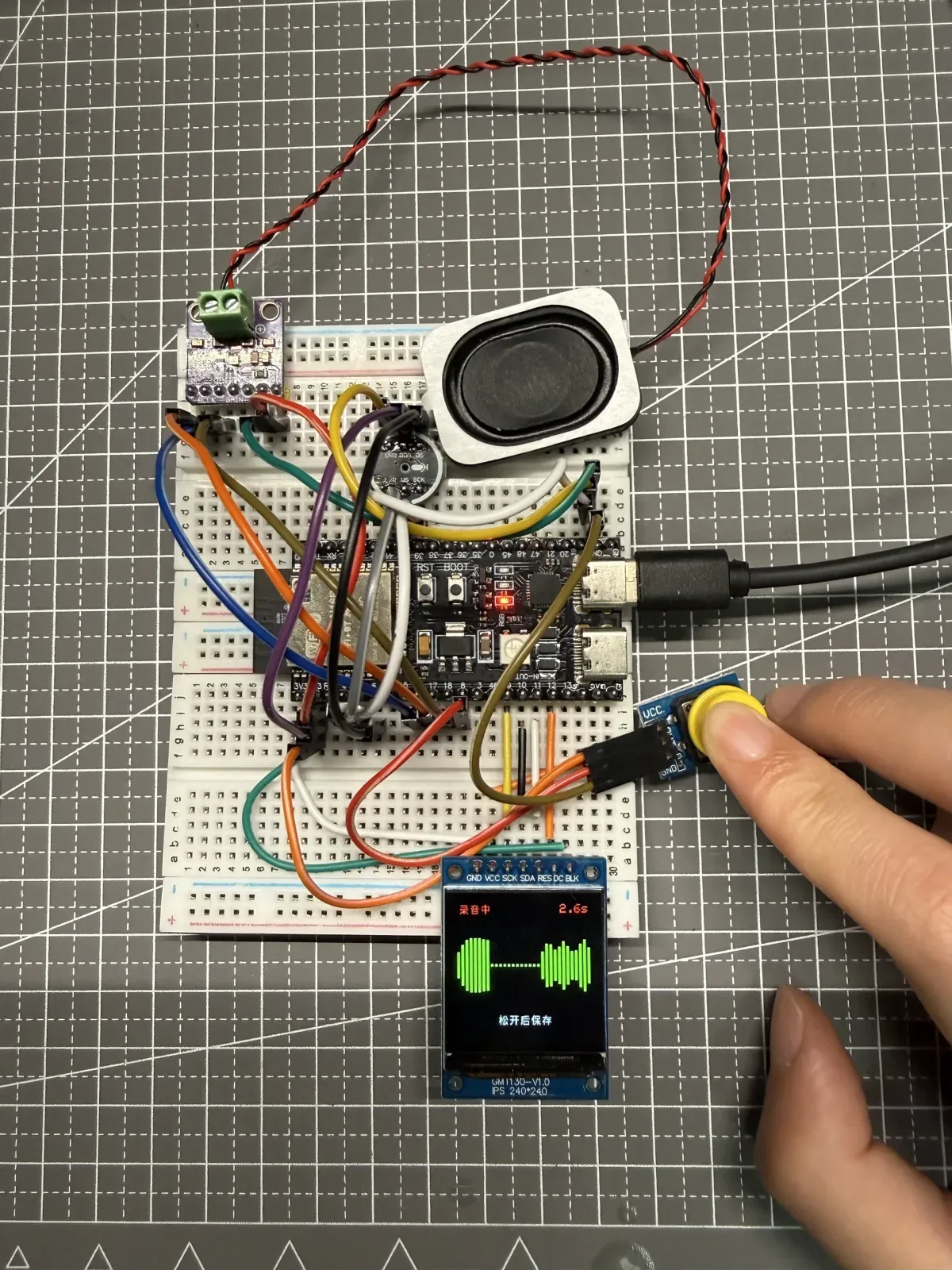
The setup uses an ESP32-S3, an INMP441, and a 240 × 240 ST7789 display. The microphone samples mono audio at 16 kHz using 32-bit I²S slots; the display runs in SPI Mode 3 at 1 MHz. Recording continues while the button is held, and the data is exported after release.
The first two recordings each lasted about 5.4 seconds but contained only 1,280 samples. At 16 kHz:
1280 / 16000 = 0.08 secondsIn other words, the recording action lasted more than five seconds, but only about 80 ms of audio remained in the buffer. The ERROR on the display was only the visible symptom; severe undersampling was the more important failure.
First failure: the Base64 output buffer had no room for the terminator
The diagnostic firmware initially exported raw audio over serial. It read 384 bytes at a time and then called Mbed TLS to produce Base64. Those 384 bytes encode to exactly 512 Base64 characters, but the code also writes a trailing \0. The old buffer allocated only 512 bytes, leaving no room for the terminator, so the function returned -42: the output buffer was too small.
The Mbed TLS Base64 API documentation states that an undersized destination buffer returns a buffer-too-small error and that the required length can be queried first. The firmware later centralized the calculation in encodedBufferSize() so this boundary no longer had to be written by hand.
uint8_t encoded [
    serial_audio_protocol::encodedBufferSize(kExportChunkBytes)];

const int error = mbedtls_base64_encode(
    encoded,
    sizeof(encoded),
    &encoded_length,
    raw + offset,
    chunk);

encoded [encoded_length] = '\0';
This fix removed the ERROR after button release, but it did not explain why the recording still contained far too few samples.
Second failure: sampling was still incomplete after the error disappeared
After fixing Base64, I kept examining the measurements instead of relying on the display state. The problem remained:
| Test stage | Button duration | Actual samples | Equivalent audio duration |
|---|---|---|---|
| Initial failure | About 5.4 s | 1,280 | About 0.08 s |
| After Base64 fix | 3,304 ms | 5,120 | About 0.32 s |
| Later test | About 5 s | 9,216 | About 0.576 s |
These measurements were decisive: the encoding error was fixed, but capture throughput was still inadequate. If “the display no longer shows ERROR” had been the acceptance criterion, I would have declared the problem solved too early.
The real root cause was inside the same main loop
At that point, the program handled three kinds of work in one loop:
-
Reading I²S data from the INMP441.
-
Detecting button presses and releases.
-
Drawing the timer, text, and volume waveform on the ST7789.
I²S capture needs to drain the receive buffer continuously. The display, however, was running over 1 MHz SPI, and operations such as a large fillScreen(), clearing regions, and redrawing text could occupy the main loop for significant stretches of time. While the loop was busy drawing, it did not call readBytes() soon enough. The interface kept updating, but the recording retained only scattered chunks of data.
This conclusion needs a careful boundary: it comes from this project’s ST7789 Mode 3, 1 MHz configuration. It does not mean every ST7789 or every SPI speed will disrupt recording. The reusable diagnostic method is to compare the theoretical sample count with the actual count and check whether other synchronous work is starving capture.
For the ESP32-S3 I²S standard mode and data-reading APIs, see the Espressif ESP32-S3 I²S documentation.
Why one round of screen-refresh reduction was not enough
The first UI optimization reduced large clears and confined waveform updates to a smaller region. The number of captured samples increased, but it remained far below the target. That showed the screen-optimization direction was useful, yet I²S reads would still suffer whenever they depended on the main loop returning promptly.
Instead of continuing to squeeze display work into the same loop, I changed the task boundaries:
-
Capture task: Continuously performs blocking I²S reads, writes data to PSRAM, and computes the latest RMS envelope for the UI.
-
Main loop: Detects the button, enforces the maximum recording time, sends heartbeats, and refreshes the display on schedule.
-
Shared state: The main loop reads only the latest volume value, sample count, stop request, and error code. It does not move each batch of audio data.
Core fix: a dedicated FreeRTOS capture task
ESP-IDF’s FreeRTOS SMP provides xTaskCreatePinnedToCore(), which can assign core affinity to a task. The firmware pins the capture task to core 0 with a stack size of 4,096 and priority 2. The behavior is documented in the ESP-IDF FreeRTOS SMP guide.
xTaskCreatePinnedToCore(
    [](void *) {
      while (!capture_stop_requested) {
        const size_t bytes_read = microphone.readBytes(
            reinterpret_cast<char *>(read_buffer),
            sizeof(read_buffer));

        // Write to PSRAM and update the latest RMS envelope
      }
      capture_task_running = false;
      vTaskDelete(nullptr);
    },
    "voice_input_capture",
    4096,
    nullptr,
    2,
    nullptr,
    0);
After the change, a five-second recording produced the full 80,000 samples. I then verified the button-release stop path: 4,109 ms produced 65,536 samples, compared with a theoretical count of about 65,744—a difference of roughly 0.32%. This showed that button release, task shutdown, and buffer accounting could work together.
Making the display smoother without disrupting capture
Once capture was complete, the waveform still looked as if it were advancing one frame at a time. The second optimization did not increase the full-screen refresh rate. Instead, it assigned different update rhythms to different content:
| UI element | Refresh strategy | Reason |
|---|---|---|
| Volume waveform | Every 40 ms, about 25 FPS | Produces more continuous-looking movement |
| Recording timer | Every 200 ms | Text does not need the waveform’s update rate |
| Waveform drawing | 32 bars; update one 4 px-wide bar at a time | Clears only a local area instead of the entire region |
| Volume-level input | RMS with attack/release smoothing | Reduces abrupt changes while preserving response to speech |
tft.fillRect(
    x,
    center_y - maximum_height,
    bar_width,
    maximum_height * 2,
    ST77XX_BLACK);

tft.fillRect(
    x,
    center_y - new_height,
    bar_width,
    new_height * 2,
    ST77XX_GREEN);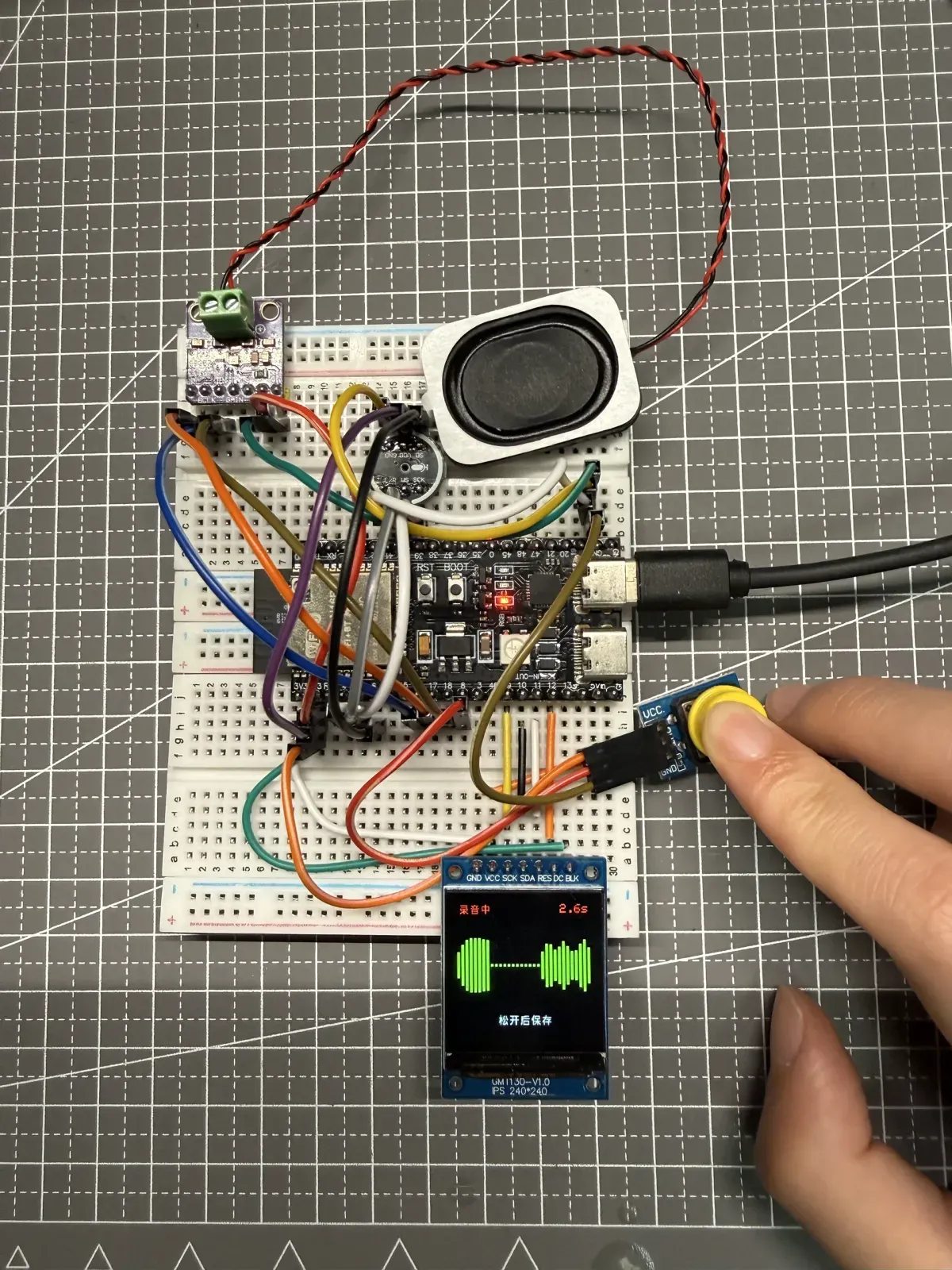
The ESP32-S3, INMP441, display, and button during a recording test. The screen shows recording status, elapsed time, and a green relative-volume waveform.
Final combined verification
After optimizing the UI, I could not accept the change merely because the animation looked smoother. I also had to verify that sampling had not regressed. The final combined test produced these results:
| Metric | Result |
|---|---|
| Button-held recording duration | 3,827 ms |
| Actual samples | 61,184 |
| Theoretical samples at 16 kHz | About 61,232 |
| Difference | About 0.08% |
| Subjective UI observation | The volume bars respond visibly to speech, and the refresh looks smoother |
| Final state | The reported SHA and sample count match, and the device returns to idle |
This acceptance test covered both audio integrity and interaction smoothness. Passing either one alone would not mean the recording feature was complete.
A reusable troubleshooting sequence
-
Quantify the symptom first. Record the button duration, sample rate, and actual sample count instead of replacing measurements with “it sounds a little short.”
-
Separate visible errors from deeper failures. Base64 error
-42was real, but it was not the only problem. -
Check whether each fix changes the core metric. After the display stopped showing an error, I still recalculated the audio duration.
-
Find slow work on shared execution paths. Display, network, logging, and file operations can all block real-time capture.
-
Change task boundaries when necessary. When continuous sampling and UI drawing have different real-time requirements, local tuning may not be enough.
-
Measure sampling again after UI optimization. Performance changes cannot be accepted by feel alone; a smoother interface must not silently lose audio data.
Public code
The firmware corresponding to the tested device version is in qh-video-voicebot / 008-voice-input / esp32. It contains the complete implementation of the dedicated capture task, display scheduler, volume envelope, WAV construction, and upload strategy.
The public code contains no real Wi-Fi passwords, device tokens, server data, or model files. The example configuration only shows which variables must be provided.