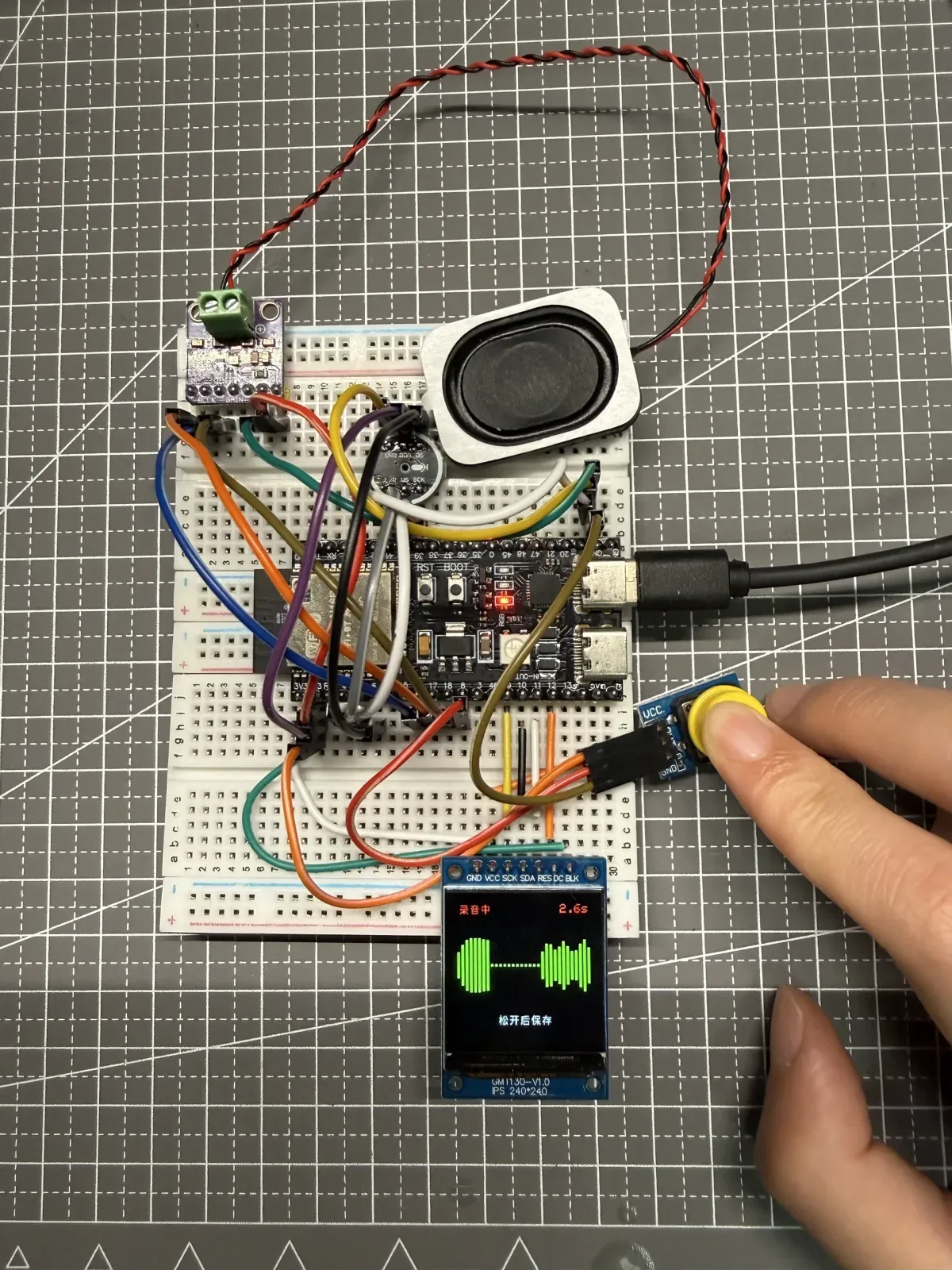
The first time this ESP32-S3 answered me, the audio was still choppy.
It was far from smooth, but at that moment I knew the entire chain—button, microphone, network connection, cloud AI, screen, and speaker—finally worked end to end. For me, this was more than one more finished feature. It meant I had truly started learning hardware development and could begin trying to build more hardware products.
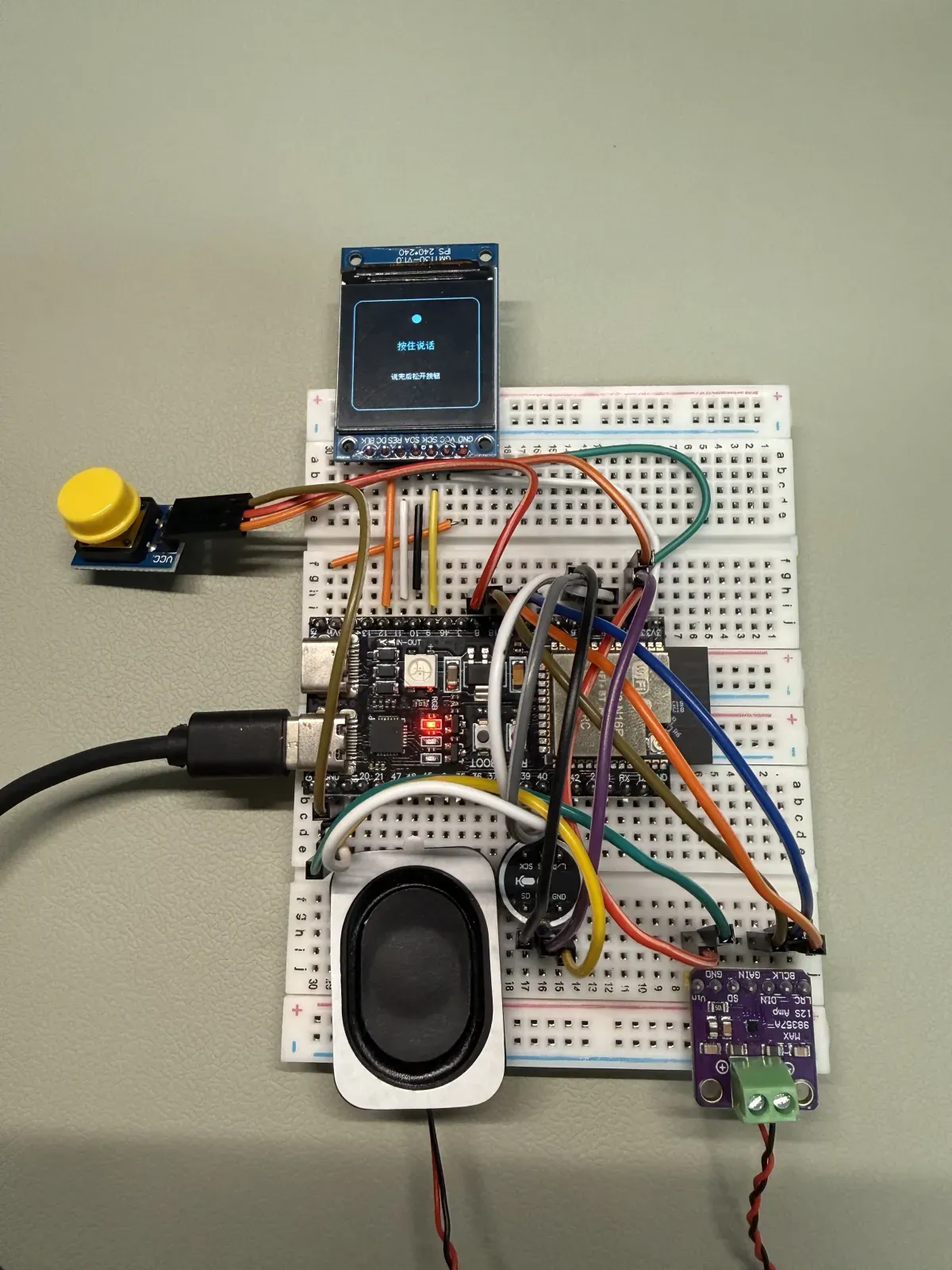
Current ESP32-S3 voice conversation prototype. The screen displays “Hold to talk,” and the same breadboard connects the button, microphone, amplifier, and speaker.
The old pipeline worked—but it didn’t feel like a conversation
My first design was a straightforward staged pipeline:
Record and save the audio
→ Transcribe the recording
→ Send the text to the AI
→ Synthesize the reply as speech
→ Play the reply through the speaker
This flow was more than a diagram. I had already run it end to end, and the device could give me a spoken answer after I finished talking.
The problem was the wait. Once recording stopped, the audio still had to pass through transcription, AI response generation, and speech synthesis, with a separate request and delay at every stage. In actual use, I would sometimes hear nothing for so long that I assumed the device had failed. Then, after I had stopped paying attention, it would suddenly speak beside me—and sometimes startle me.
There was nothing inherently wrong with the staged approach. It was useful for debugging recording, transcription, response generation, and playback separately, and it helped me verify each module step by step. But once the goal changed from “every feature works” to “the device responds like a conversation,” that way of combining the modules was no longer enough.
Real-time voice meant more than swapping APIs
I later changed the runtime to use a persistent real-time voice session. While I hold the button and speak, the device no longer waits for the complete recording before it starts processing. Instead, it continuously sends audio at a steady cadence, and the same session returns the transcription, AI response, and reply audio.
Hold the button and speak
→ Continuously send audio
→ Recognize speech and generate the answer in the same session
→ Continuously receive reply audio
→ Buffer it and play it through the speaker
From a web developer’s perspective, this can sound like a simple matter of “integrating a real-time API.” On an ESP32, however, the difficult part is that every module has limited capacity and all of them must cooperate at the right time.
The microphone must capture audio continuously. The network connection must send and receive WebSocket events promptly. The screen must update its status, while the speaker keeps receiving new PCM data. If any one step occupies the processor for too long, another part of the pipeline may fall behind.
The hardest part was coordinating limited resources
In the first version of the real-time playback logic, the main loop decoded Base64, adjusted volume, refreshed the screen, and wrote to I²S as soon as each audio chunk arrived. The implementation was direct, but it placed network reception and audio playback on the same execution path.
Espressif’s ESP-IDF I²S documentation explains that i2s_channel_write() is a blocking call: the calling task waits until the complete buffer has been written or the operation times out. In my case, while the main loop was busy writing one section of audio to I²S, it could not smoothly process incoming network fragments at the same time.
I then separated reception from playback. The network side first placed PCM data in a PSRAM buffer, while a dedicated playback task supplied data to I²S at a fixed cadence. This was not just a project-specific workaround: Espressif’s official ESP-ADF audio framework v2.8 also uses audio pipelines and ring buffers to connect processing stages.
Adding a buffer did not solve everything immediately. During one real response, the 192 KiB queue reached its usable limit of 196,607 bytes. The old implementation reported playback failure whenever it could not enqueue an entire audio fragment in one operation. I changed it to use segmented enqueueing and backpressure: when the buffer was full, the network path waited for the playback task to release space, then continued writing the remainder instead of treating a partial write as a failure of the entire turn. ESP-IDF’s FreeRTOS ring buffer extension can also create buffers with specific memory capabilities, providing a low-level tool for this kind of resource coordination.
In the final test, the device processed all 325,552 bytes of reply audio. The queue again peaked at 196,607 bytes, and the underrun count remained at 0. The screen showed no error, the answer played in full, and the noise I heard was noticeably reduced.
AI made reintegration less intimidating
Changing the architecture meant I could not directly reuse code built around “record first, then process” and “receive the complete audio, then play it.” The hardware wiring, microphone, amplifier, and speaker were still useful, but the data flow and control logic had to be redesigned for the real-time interface.
That prospect did not worry me very much. With AI assistance, reworking code and understanding it again no longer felt as difficult to begin. What truly wore me down were the implementation details: one extra newline at the end of an HTTP header, one WebSocket frame larger than the library’s default limit, or one partial buffer write could stop an entire conversation turn at a different stage.
The process was much less straightforward than I had imagined, but it gave me my first concrete understanding of how hardware development differs from ordinary web feature integration. Real-time interaction does not end when the API is connected; acquisition, networking, memory, display, and playback must continue cooperating within limited resources.
What “getting it working” meant to me
This device has now completed button-triggered recording, real-time voice processing, on-screen status feedback, and a full spoken reply through the speaker. The source code is public, while the stable installation and configuration flow is still being organized and validated.
When I first heard the choppy response, I did not think, “The product is finished.” I thought, “This path really can work.” From my first wiring attempt and the first time I got the screen to display anything, to a device that can now hear and answer, I am no longer just assembling modules by following instructions. I am beginning to understand how several limited hardware capabilities can work together toward one product goal.
That is what getting voice conversation working means to me: I have crossed the beginner threshold, and I can keep building hardware products that genuinely interact with people.